
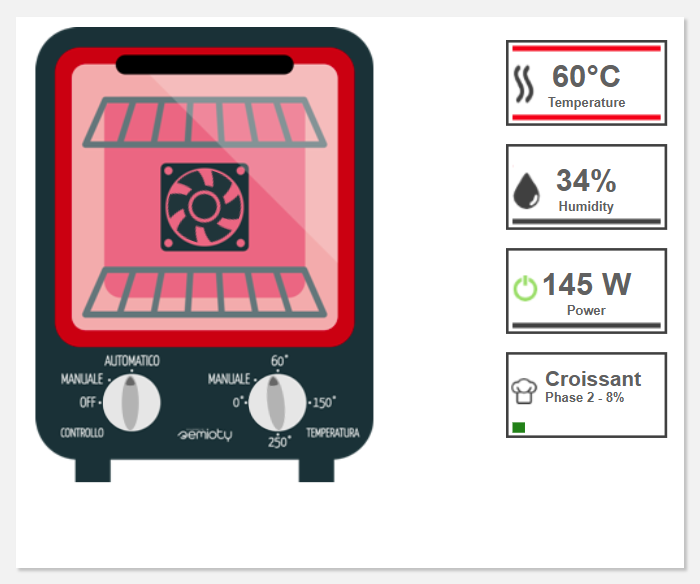
This widget shows a synoptic of the Thing with overlayed metric data.
code_blocksCode View
Template Syntax
Below you can find some examples of how to use the component within a template.
<schema-widget class="svg" width="100%">
   <composite-part filter="ovenSchemaSvg">
       <metric name="Status"></metric>
       <metric name="Temperature"></metric>
       <metric name="Humidity"></metric>
   </composite-part>
</schema-widget>
Component Reference
Here is a comprehensive list of all the elements and properties that can be used to configure the component.
| Schema <schema-widget> | |
|---|---|
| PROPERTIES | |
| CSS Class | The name(s) of the CSS class used to customize the widget layout. Type: STRING | Optional class="my-custom-class" |
| Title | The title displayed on the top part of the widget box. Type: STRING | Optional [title]="'Details'" |
| Visibility Condition | The expression that allows you to reduce the visibility of the element. Type: STRING | Optional *ngIf="getUser().organizationId != null" |
| Width | The width of the widget (e.g. 500px). Type: STRING | Optional width="500px" |
| SUB-ELEMENTS | |
| Metric | The metric whose label and current value must be displayed within the schema. Multiple | Optional <metric name="Temperature"></metric> |
| Property | The property whose label and current value must be displayed within the schema. Multiple | Optional <property name="serialNumber"></property> |
| Composite Part | The widget part combining multiple properties and metrics. Multiple | Optional <composite-part> <metric name="Temperature"></metric> <metric name="Humidity"></metric> <property name="properties.type"></property> </composite-part> |
| Metric <metric> | |
|---|---|
| PROPERTIES | |
| Filter | The name of the filter used to transform and display values. Type: FILTER | Optional filter="fooBarFilter" |
| Label | The metric alternative label. Type: STRING | Optional label="Temperature" |
| Name | The metric whose value(s) must be loaded by the widget. Type: METRIC | Required name="Temperature" |
| Unit | The unit of measurement to be displayed along the value. Type: STRING | Optional unit="°C" |
| Visibility Condition | The expression that allows you to reduce the visibility of the element. Type: STRING | Optional *ngIf="getUser().organizationId != null" |
| Property <property> | |
|---|---|
| PROPERTIES | |
| Description | The property description. Type: STRING | Optional description="fooBar" |
| Filter | The name of the filter used to transform and display values. Type: FILTER | Optional filter="fooBarFilter" |
| Label | The property alternative label. Type: STRING | Optional label="Temperature" |
| Name | The property whose value must be loaded by the widget. Type: PROPERTY | Required name="serialNumber" |
| Visibility Condition | The expression that allows you to reduce the visibility of the element. Type: STRING | Optional *ngIf="getUser().organizationId != null" |
| Composite Part <composite-part> | |||||
|---|---|---|---|---|---|
| PROPERTIES | |||||
| Description | The composite-part description. Type: STRING | Optional description="fooBar" |
||||
| Filter | The filter applied on the composite-part to transform or display its value. Type: FILTER | Optional filter="fooBarFilter" |
||||
| Label | The label displayed by the widget. Type: STRING | Optional label="fooBar" |
||||
| Name | The composite-part name. Type: STRING | Optional name="fooBar" |
||||
| Visibility Condition | The expression that allows you to reduce the visibility of the element. Type: STRING | Optional *ngIf="getUser().organizationId != null" |
||||
| SUB-ELEMENTS | |||||
| Metric | The metric whose value must be loaded within the composite-part. Multiple | Optional <metric name="Temperature"></metric>
|
||||
| Property | The property whose value must be loaded within the composite-part. Multiple | Optional <property name="serialNumber"></property>
|
||||
Comments
0 comments
Please sign in to leave a comment.